Automating Distraction Blocking with Pi-hole v6 and dedistracter
During the pandemic, when our home became a classroom and an office as well as all its usual functions, and we were all glued to computers to get stuff done, it became apparent that more than one member of the Johns Household could be easily distracted by the other things that always-on internet connectivity could afford.
I’d been happily using Pi-hole on a Raspberry Pi for a few years by this point and simply blocked the distracting domains. It was pretty effective.
Then in the evenings when we wanted to be distracted by music and comedy videos on YouTube, I’d reach for my phone and toggle the deny rule off again. Inevitably, I would go to bed forgetting to reinstate the block only to be reminded the next morning when I’d hear one of the kids watching somebody play computer games very loudly, when they should have been in Google Classroom.
Since scheduling wasn’t offered by Pi-hole, I quickly wrote a couple of shell scripts and some cron jobs that toggled domains in Pi-hole’s database. It was all humming along nicely for years. Recently Pi-hole v6 landed and the scheduled blocks appeared in the UI but didn’t actually work. Today, I finally got around to fixing it after hearing somebody play computer games very loudly. The old DNS reload commands had changed, and my carefully crafted schedule was out the window.
# Dedistracter
I had forgotten exactly how I’d rigged this set-up together and none of the scripts were under source control. so I decided to fix it properly and make it reusable for anyone else who finds themselves in the same boat. Thus, dedistracter was born.
What does it do?
- Works with Pi-hole v6+ (yes, the new gravity.db schema)
- Automates scheduled blocking/unblocking with robust Bash scripts and cron
- Installs as a .deb (so you don’t have to copy files around)
- Configurable: set your own schedule and domains in one place
- Tested and documented: comes with a script to check it’s actually working
# How It All Fits Together
Here’s the gist:
- Block/Unblock Scripts: These enable or disable domains with a
schedulingcomment in Pi-hole’s gravity.db. - Cron Generator: Reads your schedule from environment variables and sets up the right jobs to block and unblock at the right times.
- Test Script: Uses
digto check that domains are really blocked or unblocked (and flushes DNS cache for good measure). - Debian Package: Install with
dpkg -i dedistracter_*.deband tweak/etc/default/dedistracterto your liking. - Docker Build: Build the .deb on any platform using Docker BuildKit.
# Want to Try It?
Here’s how you can get scheduled distraction blocking up and running:
- Clone the repo:
git clone https://github.com/johnsyweb/dedistracter.git cd dedistracter - Build the .deb (or just download from Releases):
./build-deb.sh - Install on your Pi-hole server:
sudo dpkg -i /path/to/dedistracter_*.deb -
Change the schedule (optionally):
Edit
/etc/default/dedistracter(created by the package) to set your desired blocking/unblocking times. For example:BLOCK_HOUR=2 BLOCK_MINUTE=0 UNBLOCK_HOUR=20 UNBLOCK_MINUTE=0Then run:
sudo /opt/dedistracter/dedistracter-cron-generatorYour new schedule will take effect automatically. Note:
/etc/default/dedistracteris a Debian conffile, so your changes will be preserved during package upgrades. -
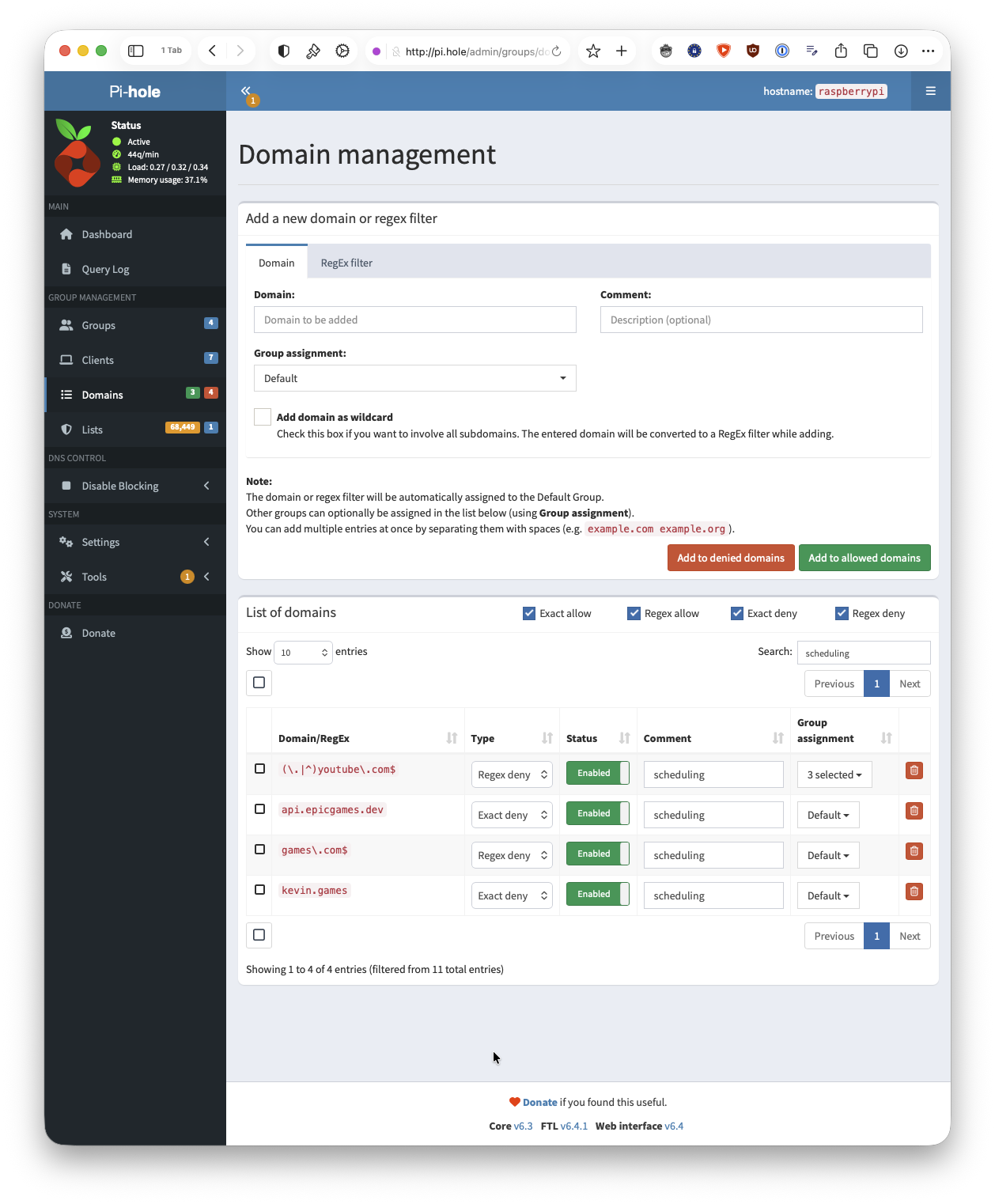
Set the comment field to “scheduling” for the domains you want to schedule blocking:
- Check it’s working:
sudo /opt/dedistracter/test-dedistracter.sh
# The Result
Now, Pi-hole blocks distractions exactly when I want, with no more manual toggling. Next time I have broken scripts after an upgrade, I know where to go to fix them. The screenshot above shows the Pi-hole admin UI with scheduled domains managed by dedistracter. It’s one less thing to think about, and one fewer distraction for the household tech admisistrator.
If you want to give it a go, the dedistracter repo has everything you need. Feedback, questions, and contributions are always welcome.
Stay focused (or at least try to)!